Contents
To change your Gmail address, go to myaccount.google.com, open Personal info, select Email, then Google Account email, and choose "Change Google Account email." You pick a new @gmail.com username and keep everything in the account: emails, Drive files, Photos and purchases. Your old address keeps working as an alternate, so nothing sent to it is lost.
Key Takeaways
- You can change an @gmail.com address to another @gmail.com address without creating a new account
- You can create a new address once every 12 months, up to 3 new addresses per account
- Your old address stays attached to your account permanently and still receives mail
- You cannot delete the new address once it is created
- Chromebooks, "Sign in with Google" on other sites and Chrome Remote Desktop may need attention afterwards
How to change your Gmail address step by step
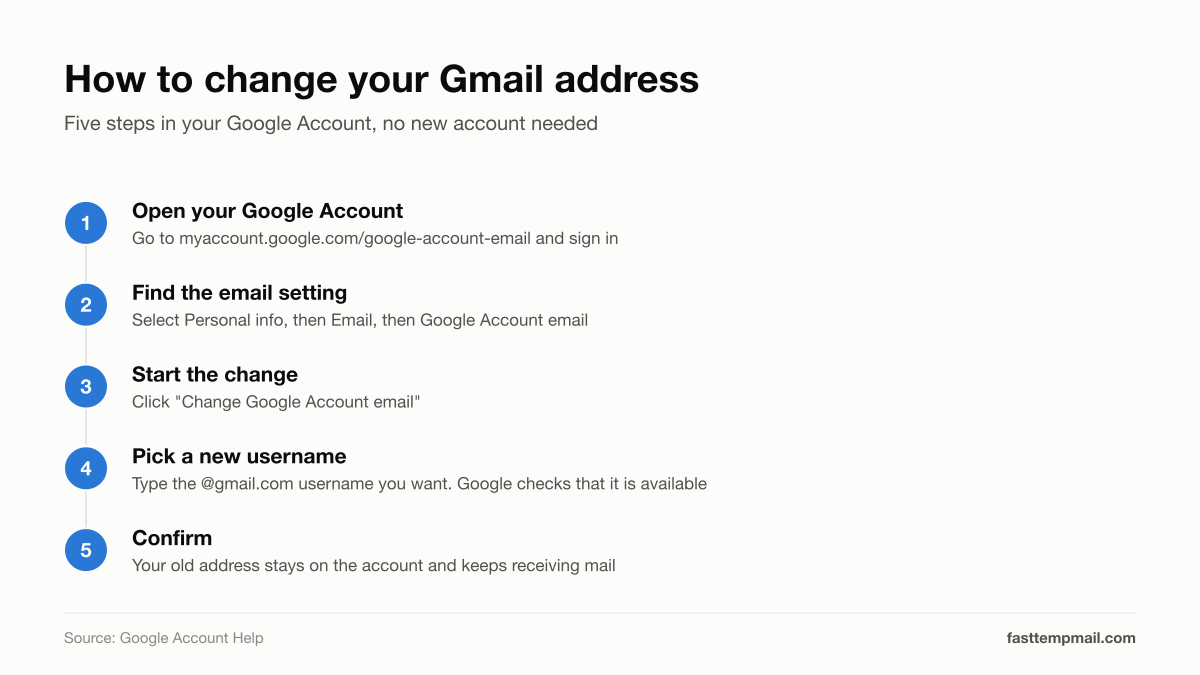
These are the steps from Google's help page for a computer. The same help page has separate instructions for Android and iPhone.
- Go to myaccount.google.com/google-account-email and sign in
- Select Personal info, then Email, then Google Account email
- Click Change Google Account email
- Type the new username you want. Google checks whether it is available
- Confirm the change
There is no data migration and no waiting period for the switch itself. You stay signed in, and your inbox, Drive, Photos and YouTube history remain where they are.
If you do not see "Change Google Account email," the option has not reached your account yet. Google began rolling the feature out in late 2025 and has been expanding it in stages through 2026, with reports that it reached all US users on March 31, 2026. Work, school and other organization-managed accounts follow a different process controlled by the administrator.
What are the limits?
| Rule | Detail |
|---|---|
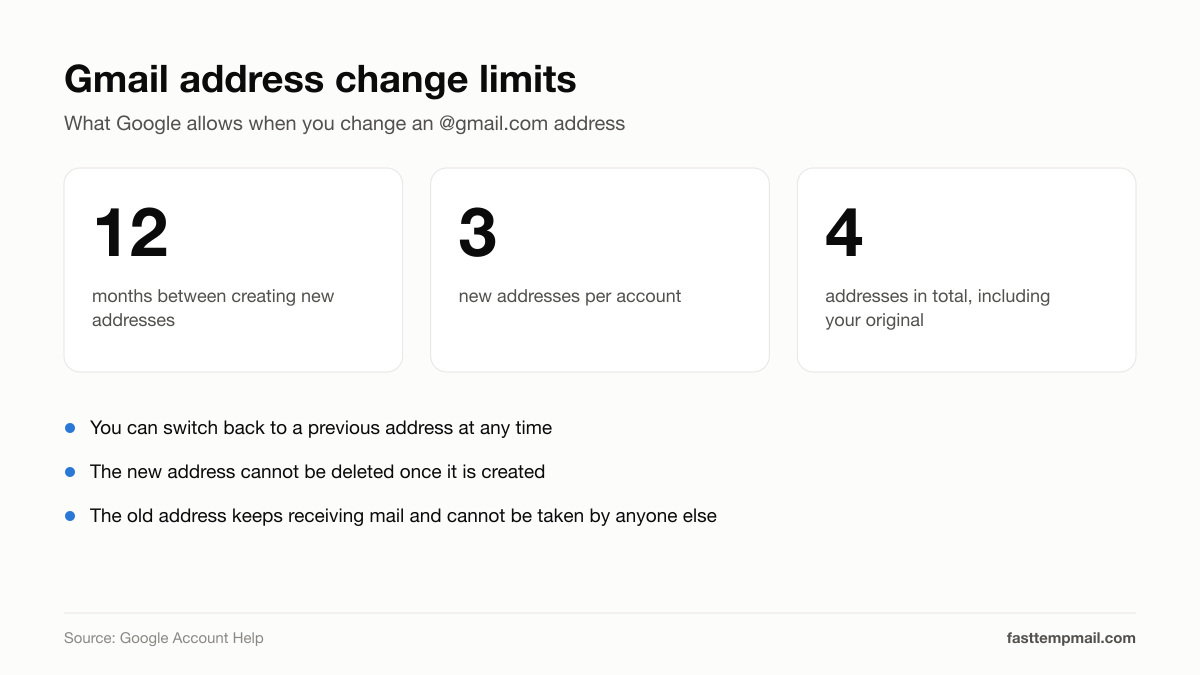
| How often | One new @gmail.com address every 12 months |
| Lifetime maximum | 3 new addresses, so 4 in total including your original |
| Switching back | You can return to a previous address at any time |
| Deleting the new address | Not possible once it is created |
| Reusing after switching back | The newer address cannot be used again for 12 months |
The 12-month rule is the one to respect. If you pick a username you regret, you can go back to the old one immediately, but you cannot try a third option until a year has passed. Choose carefully and check the spelling before you confirm.
What happens to your old Gmail address?
It becomes an alternate email on the same account. Google's wording: "Emails sent to both your old and your new Google Account emails that end in @gmail.com will appear in your Gmail inbox."
That has three practical consequences:
- Nothing bounces. People and services that still have your old address can reach you
- Nobody else can take it. The old address stays permanently attached to your account and cannot be registered by another person
- You cannot get rid of it. The old address cannot be deleted
What can break after you change it?
Google flags a short list of things to check:
- Chromebooks. You may need to sign in again, and local settings can be affected
- Sign in with Google. Third-party sites that use your Google login may treat the new address differently
- Chrome Remote Desktop. Existing connections may need to be set up again
- App settings. Some apps may reset their settings
Google recommends backing up your data before you make the change. Google Takeout exports a copy of everything in your account.
After the switch, update the address on the accounts that matter most: banking, government services, your employer and anything used for password recovery. Mail to the old address still arrives, but having records that match your current address avoids confusion later.
Should you change your Gmail address?
It is worth it if:
- Your address is an old nickname you no longer want on a CV or invoice
- Your name has changed
- You want to stop publishing personal details, such as a birth year, in your address
It will not help if:
- Your goal is to escape spam. Mail to the old address lands in the same inbox, so every mailing list and data broker that has it can still reach you
- Your address was exposed in a breach. The old address remains a valid way to reach your account. Change your password and turn on 2-Step Verification instead
A new address only stays clean if you stop handing it out. Give the real one to people and to accounts you care about, and use something else for the rest.
How to keep the new address spam-free
- Use a disposable inbox for one-off signups. Downloads, free trials, Wi-Fi portals and one-time discount codes do not need your real address. FastTempMail gives you an inbox in one click with no registration, and it deletes itself afterwards
- Use an alias for accounts you keep. A forwarding address lets you cut off a sender without changing your real one. See temp email vs. email alias for when to use each
- Unsubscribe instead of deleting. Gmail's Manage subscriptions view lists senders by frequency with one-click unsubscribe
- Clean up what already reaches you. Our guide on how to stop spam emails walks through the rest
FAQ
Can I change my Gmail address without creating a new account? Yes. Google now lets you replace an @gmail.com address with a different @gmail.com address on the same account. Your emails, Drive files, Photos and purchases stay in place, and your old address keeps working as an alternate that delivers to the same inbox.
How many times can I change my Gmail address? You can create a new @gmail.com address once every 12 months, up to 3 new addresses per account, which makes 4 including the original. You can switch back to a previous address at any time without waiting.
Will I still get emails sent to my old Gmail address? Yes. The old address becomes an alternate email on your account, and mail sent to either address appears in the same Gmail inbox. The old address stays attached to your account permanently and cannot be claimed by anyone else.
Why don't I see the option to change my Gmail address? The feature has been rolling out in stages since late 2025, so it may not have reached your account or region yet. It also does not apply to work or school accounts, where the administrator controls the address.
Does changing my Gmail address stop spam? No. Mail sent to your old address still arrives in your inbox, so existing senders can still reach you. To reduce spam, unsubscribe from senders you do not want and use a disposable address for new signups.
Also protect your IP address
NordVPN — audited no-logs policy, 111 countries. Sponsored
Share this article
Written by
Ajjlal Ahmed — creator of FastTempMail, a privacy-focused disposable email service. Passionate about tools that respect users.
View portfolioRelated articles
AI Is Now the Biggest Cybersecurity Risk of 2026, Says WEF
94% of organizations say AI is the top driver of cyber risk this year. Here's what the World Economic Forum's 2026 report reveals and how to stay safe.
Best Free Password Manager in 2026: Top 5 Picks Tested
The best free password managers in 2026 offer unlimited passwords on all devices at zero cost. Here's how Bitwarden, Proton Pass, and others compare.
Can Temp Email Receive Attachments? Files, PDFs, and More Explained
Yes, many temp email services can receive attachments. Learn which ones work, what file types arrive safely, and how to download files from a disposable inbox.